Software Designed for Real Business Workflows
Manage tenders, estimates/BOQs, project budgets, procurement, materials, subcontractors, progress billing, cash flow, and profitability in one integrated construction ERP.
Are your projects still managed manually?
When multiple projects run simultaneously, fragmented data creates cost overruns, delays, cash-flow pressure, and declining margins.
Actual costs become visible only near completion.
Purchases, deliveries, usage, returns, and waste are disconnected.
Milestones depend on chat and spreadsheet reports.
Progress, invoices, retention, and payments are not compared.
Milestone invoices do not follow actual progress quickly.
Revenue, committed cost, actual cost, and cash flow remain separate.
One ERP for the entire construction lifecycle
Lead & Tender
Opportunities, surveys, tenders, quotations, follow-up, and win/loss tracking.
Project Control
Scope, value, schedule, milestones, progress, cost, revenue, and profitability.
Procurement & Finance
Project requirements, vendors, POs, receipts, billing, payments, and cash flow.
An integrated construction workflow
Detect cost overruns early
Connect estimates, project budgets, and purchasing
Control warehouse, site, equipment, and subcontractors
Project Materials
- Central, project, site, and temporary storage
- Requests, receipts, issues, transfers, and returns
- Used, remaining, damaged, lost, and waste
- Real-time quantity and location
Project & Partner Progress
- Planned versus actual progress
- Milestones, dates, status, photos, and notes
- Subcontract scope, progress, invoices, retention
- Equipment usage, rental, condition, and cost
Connect progress, milestone invoices, and cash flow
Keep variation orders and documents organized
Variation Orders
- Additional scope, cost, and revenue
- Approval and customer confirmation
- Revised contract value
Project Documents
- Contracts, POs, drawings, BOQs, estimates
- Instructions, permits, BAST, test reports
- Invoices and handover documents
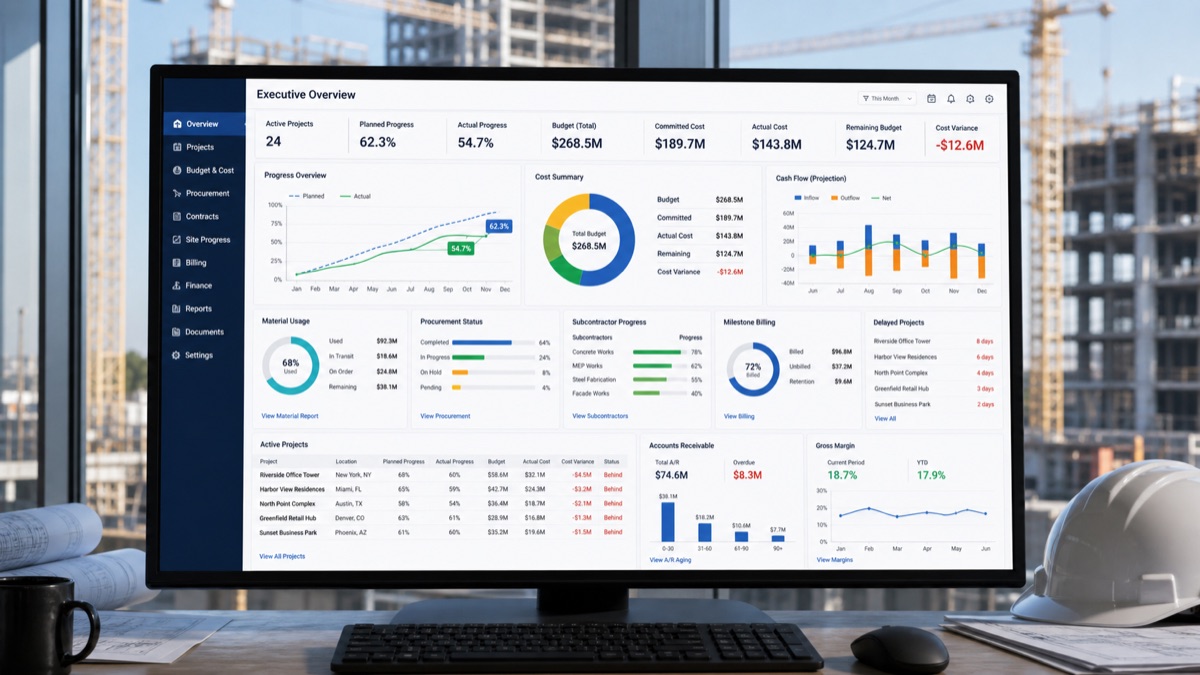
Real-time construction dashboard
Move from spreadsheets to one source of project data
Before ERP
- Estimates, budgets, requests, and reports are separate
- Site material requests arrive by chat
- Finance cannot see the latest budget
- Losses appear after costs are collected
With Construction ERP
- Quotations become projects and BOQs become budgets
- POs immediately become committed costs
- Progress drives milestone billing
- Cost, cash flow, and profit appear in real time
Benefits for construction companies
Supported modules and industries
A structured ERP implementation
- 01Business Process Analysis
Analyze tendering, estimating, projects, procurement, sites, billing, and finance.
- 02Workflow Configuration
Configure projects, BOQs, budgets, approvals, and cost categories.
- 03Data Preparation & Migration
Prepare customers, suppliers, materials, projects, budgets, and assets.
- 04User Training
Train sales, estimators, PMs, purchasing, warehouse, site, and finance.
- 05Go Live
Launch ERP for projects and operational transactions.
- 06Support & Optimization
Improve continuously as project needs evolve.
Construction ERP frequently asked questions
Can ERP manage many projects at once?
Yes. Each project has its own budgets, costs, purchasing, materials, progress, billing, and reports.
Can BOQs be compared with actual costs?
Yes. Budgets are compared with committed and actual costs in real time.
Do POs affect the project budget immediately?
Yes. POs can become committed costs before supplier invoices arrive.
Can progress drive milestone invoices?
Yes. Progress or milestones can form the billing basis under the contract.
Can cash advances and subcontractors be managed?
Yes. Advances, settlements, scope, progress, invoices, retention, and payments are supported.
Can materials be tracked per project?
Yes. From purchasing and warehouses through site transfers, usage, returns, and remaining stock.
Can profitability be calculated per project?
Yes. Revenue and every project cost are connected to calculate gross profit and margin.
Connect tenders, budgets, materials, progress, billing, and finance.
Prevent cost overruns, improve cash-flow control, and understand profitability for every project in real time.