Software Designed for Real Business Workflows
Manage sales, purchasing, inventory, multi-warehouse operations, delivery, invoicing, and finance in one integrated ERP platform with real-time visibility into stock, orders, shipments, receivables, purchasing, and profitability.
Are your distribution operations still disconnected?
As products, customers, salespeople, warehouses, and transactions grow, data scattered across spreadsheets, chat, and separate applications puts sales and margins at risk.
System stock differs from physical stock and sales cannot see availability in real time.
Allocation, picking, packing, and delivery status are hard to track.
Reorder points and sales demand do not drive replenishment.
Credit limits, due dates, aging, and payment history lack control.
Customer prices and discounts vary without margin approvals.
Management waits for manual consolidation to understand profitability.
One ERP for the entire distribution process
Sales Management
Customers, quotations, sales orders, price lists, discounts, targets, sales performance, and purchase history.
Inventory Management
Stock movements, transfers, counts, batch/lot, expiry dates, minimum stock, and reorder points.
Purchasing
Purchase requests, RFQs, purchase orders, suppliers, goods receipts, vendor bills, and approvals.
An integrated distribution workflow
Accurate inventory and multi-warehouse control
Inventory Status
- Available, reserved, incoming, and outgoing stock
- Damaged, returned, slow-moving, and dead stock
- Batch, lot, expiry date, and stock turnover
- Controlled stock counts and adjustments
Multi-Warehouse
- Quantity and bin location by warehouse
- Minimum stock and reorder points
- Transfer history and user access
- Best warehouse selection for each order
Faster sales with controlled pricing and margins
Quotations and orders use customer pricing, categories, quantities, discounts, and current stock. Approval is triggered when prices or discounts exceed policy.
Purchasing driven by actual demand
The system considers minimum stock, outstanding sales orders, incoming POs, and historical consumption to reduce both overstock and stockouts.
Supplier Price
Compare purchase prices and transaction history.
Lead Time
Measure supplier speed and delivery reliability.
Quality
Track quality, outstanding POs, and payables.
Picking, packing, delivery, and returns in one workflow
Sales Return
- Product, quantity, reason, and condition
- Replacement and credit note
Purchase Return
- Damaged or PO-mismatched goods
- Supplier quantity and quality discrepancies
Control customer receivables and credit limits
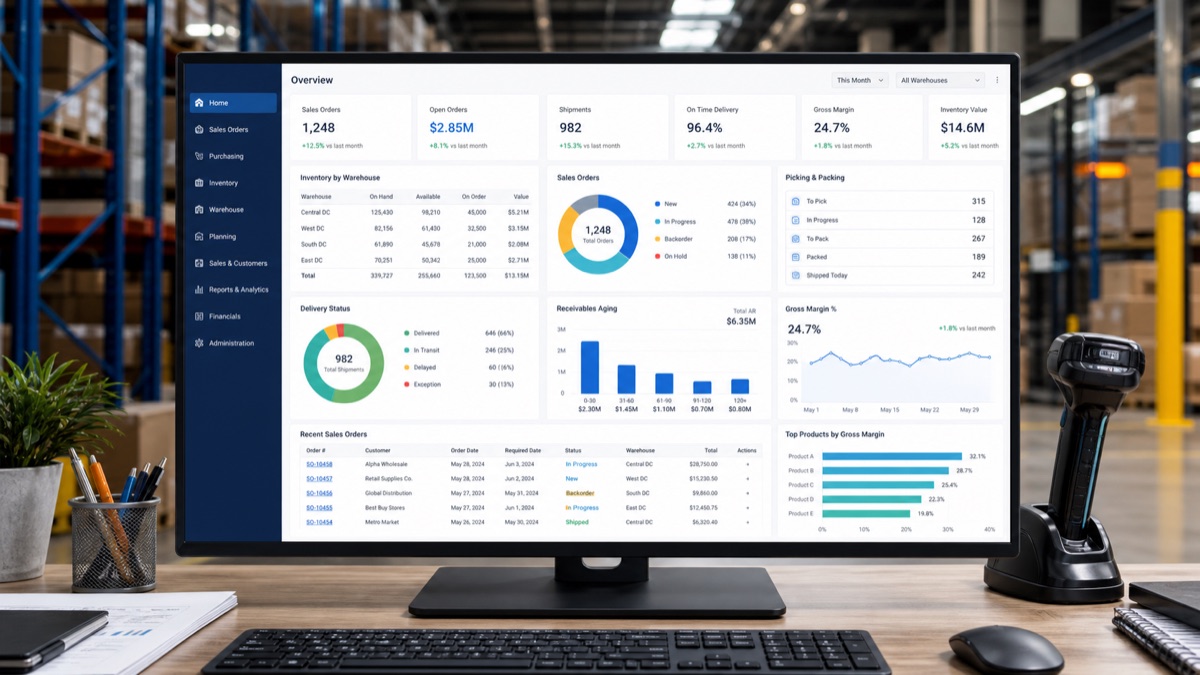
Real-time distribution dashboard
Move from manual work to integrated operations
Before ERP
- Orders arrive by chat and stock is checked manually
- Purchasing receives requirements in spreadsheets
- Invoices and payments sit in separate systems
- Management manually combines reports
With Distribution ERP
- Sales sees and reserves stock in real time
- Warehouse receives picking requests instantly
- Receipt, delivery, invoice, and payment stay connected
- Management sees the business in one dashboard
Benefits for wholesale & distribution
Modules tailored to your business
Built for many distribution industries
A structured ERP implementation
- 01Business Process Analysis
Analyze sales, purchasing, warehouse, delivery, and finance.
- 02ERP Configuration
Configure workflows, pricing, approvals, warehouses, and access.
- 03Data Preparation & Migration
Prepare products, customers, suppliers, stock, price lists, and opening balances.
- 04User Training
Role-based training for every user.
- 05Go Live
Launch ERP for daily operations.
- 06Support & Optimization
Continuously improve as the business evolves.
Distribution ERP frequently asked questions
Can the ERP support multiple warehouses?
Yes. It supports multiple warehouses and inter-location stock transfers.
Can pricing differ by customer?
Yes. Price lists can follow customer, category, quantity, and company policies.
Is customer credit-limit control available?
Yes. The ERP monitors outstanding receivables and warns when limits are exceeded.
Can sales see stock in real time?
Yes, according to the access rights provided.
Can it manage batch and expiry dates?
Yes. Batch, lot, and expiry tracking can be applied where required.
Does it support multiple branches?
Yes. It can support multiple branches, warehouses, and companies.
Can it integrate with other applications?
Yes. API integration can be implemented according to the connected system.
Faster orders, more accurate inventory, and better margin control.
Discuss your distribution process with Bestada and find the ERP configuration that best fits your business.